 iconsmith
Icons that fit where they live.
Tell your agent what you want. iconsmith finds the artwork, lays out options side by side, shows each one on a real taskbar, desktop and phone, then makes the files, or puts the icon straight onto your Windows taskbar.
An MCP server for Claude Code, Codex and other agents, plus a CLI and a web studio. Free and open source.

 16
16 24
24 32
32 48
48From an idea to an icon in four steps
Each step is one small image, so iterating costs your agent almost nothing and costs you a glance. Nothing is saved until you pick.
-
Find artwork
Search more than 200,000 open-source icons and brand logos. Results come back as one numbered sheet: say “number 7” instead of guessing from names.
Tool:
search_icons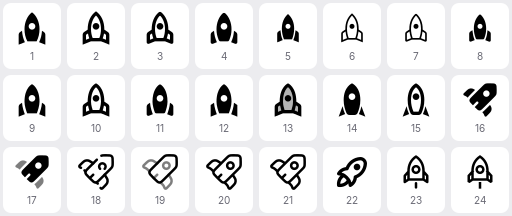
“rocket”, as your agent sees it. -
Compare looks
Rows are artwork, columns are styles: colors, backgrounds, gradients, shapes. Each cell shows the icon large and at 24 px on dark and light. Pick a cell like “B3”.
Tool:
design_icons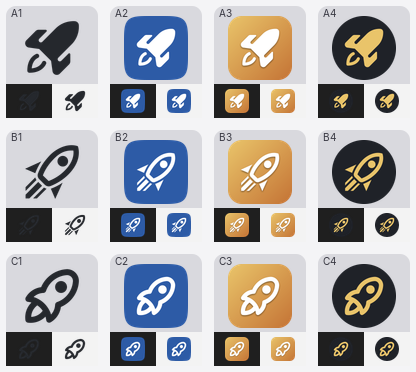
Three rockets, four styles, one image. -
See it in place
Mock the icon up on a Windows taskbar, Start menu, desktop, File Explorer, a browser tab, the macOS Dock, an iPhone and Android. On Windows, it sits between your own pinned apps.
Tool:
preview_icon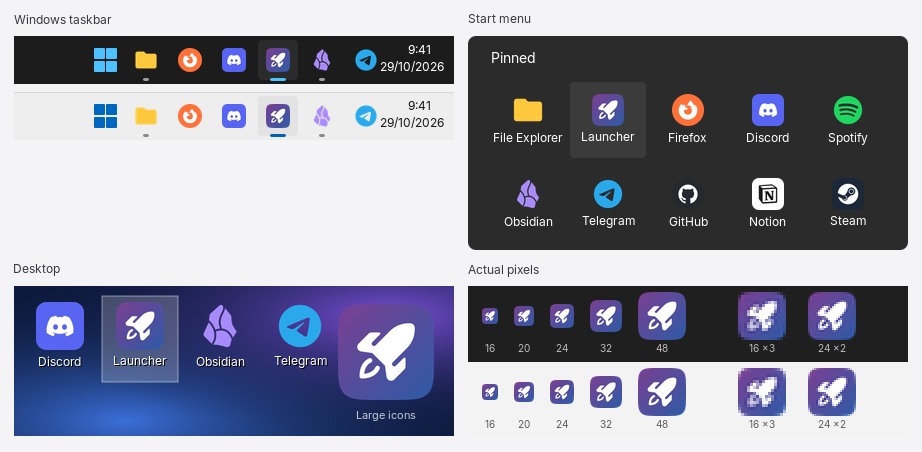
Catch the icon that vanishes on a light taskbar before you apply it. -
Ship it
Get a Windows
.ico, a macOS.icns, a complete favicon and web-app set, or PNGs at every size. On Windows, put it on any app's Start menu and taskbar shortcuts in the same breath.Tools:
make_icon,app_apply_iconWindows .icowith 16, 24, 32, 48, 64, 128 and 256 pxmacOS .icnsfrom 16 to 1024 px, including Retina sizesWeb favicon.ico, Apple touch icon, 192 and 512 px app icons, a maskable icon,site.webmanifestand the<link>tagsAnything else PNGs at every size from 16 to 1024 px One design, every format.
Your taskbar, restyled in one sentence
iconsmith knows how Windows keeps pinned apps, so your agent can restyle every icon, pin, unpin and reorder apps, and tidy the desktop. Changes that need Explorer to restart are batched into one restart.
Read the taskbar and apps guide or the desktop guide.
Make all my taskbar icons white.
taskbar_status()
app_apply_icon(apps: [13 pinned apps], source: "app", style: "color=white")
Done: 13 icons are now white, each from the app's own artwork. Want them back? Say “undo” and I'll restore the originals.
Hand this to your agent
Paste this into Claude Code, Codex or any agent with a terminal. It installs iconsmith, reads how to use it, and checks your PC.
Agents can also read llms.txt and every docs page as Markdown (add .md to the address).
Set up iconsmith for me (https://iconsmith.guptajayam.com). It's an MCP server
for designing icons and customizing the Windows taskbar and desktop.

1. If you are Claude Code, run:
     /plugin marketplace add JayceeGupta/iconsmith
     /plugin install iconsmith@icon-playground
   Otherwise: git clone https://github.com/JayceeGupta/iconsmith, run npm install
   in it, and add a stdio MCP server named "iconsmith" that runs:
     node <clone>/bin/iconsmith-mcp.mjs
2. Read https://iconsmith.guptajayam.com/llms.txt to learn how to use it well.
3. On Windows, call the doctor tool. Then tell me what you can do.
Safe to try
iconsmith changes shortcuts and one registry value, the same things you'd change by hand. Everything it changes, it can put back.
- Undo for everythingOriginal icons are recorded before the first change; the pinned-apps list is backed up before every change.
- One Explorer restart per changePin, unpin and reorder in a single call, with a dry run to check first.
- Rolls back on failureIf a pin change fails halfway, the registry and shortcuts go back exactly as they were.
- Stays on your PCThe only network calls are icon searches and downloads from Iconify.
Where it runs
| Design and export | Taskbar and desktop | |
|---|---|---|
| Windows 11 and 10 | Yes | Yes |
| macOS and Linux | Yes | No (these change Windows itself) |
| Agents | Claude Code (plugin with a skill and slash commands), Codex, Cursor, VS Code and any client that speaks MCP | |